Android Application/Package APK Structure Part 1
AndroidAndroid applications are installed in the form of application package files, commonly known as APK files. APK files are container files that contain both application code and resources, as well as the application manifest file. APK files are simply ZIP files and you can examine the content by extracting them with any compression utility that supports the ZIP format. You may notice that the naming convention for APK files is in reverse-domain style; this is to avoid naming collisions. The same naming convention can be seen in many places in Android, such as custom permissions and so on, e.g., com.ryantzj.testapp
The following image and table break down the APK file and explain the content.
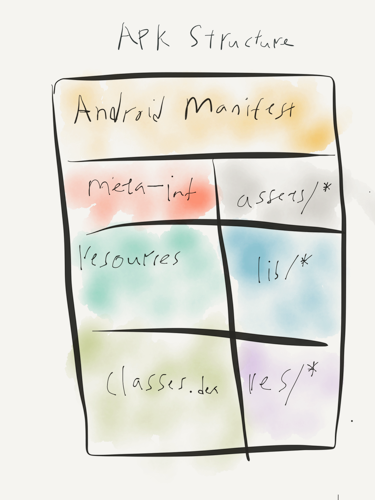 Poorly draw APK files structure
| Entry | Notes |
|---|---|
| AndroidManifest.xml | the manifest file in binary XML format. |
| classes.dex | application code compiled in the dex format. |
| resources.arsc | file containing precompiled application resources, in binary XML. |
| res/ | folder containing resources not compiled into resources.arsc |
| assets/ | optional folder containing applications assets, which can be retrieved by AssetManager. |
| lib/ | optional folder containing compiled code - i.e. native code libraries. |
| META-INF/ | folder containing the MANIFEST.MF file, which stores meta data about the contents of the JAR. which sometimes will be store in a folder named original.The signature of the APK is also stored in this folder. |
Every APK file includes an AndroidManifest.xml file which declares the application’s package name, version components, and other metadata. Full details of Android manifest specs can be viewed in the Android documentation. Below are some common attributes that can be identified in AndroidManifest.
| Attributes | Notes |
|---|---|
| Manifest tag | contains android installation mode, package name, build versions |
| Permissions | custom permission and protection level |
| uses-permission | requests a permission that must be granted in order for it to operate; full list of permission API can be found here. |
| uses-feature | Declares a single hardware or software feature that is used by the application. |
| Application | The declaration of the application. Will contains all the activity |
| Activity | Declares an activity that implements part of the application visual user interface. |
| intent-filter | Specifies the types of intents that an activity, service, or broadcast receiver can respond to. |
| service | Declare a service as one of the application components. |
| receiver | Broadcast receivers enable applications to receive intents that are broadcast by the system or by other applications, even when other components of the application are not running. |
| provider | Declares a content provider component. A content provider is a subclass of ContentProvider that supplies structured access to data managed by the application. |
We will continue more on APK Structure and how can we conduct static analysis on it, stay tuned.
BONUS
Meitu Permission discussion
Back story can be traced back to @FourOctets’s thread (2017 historical reference). As mentioned in the previous post, Security Permissions are controlled by parts of Android’s rich API. Each application must declare upfront what permissions it requires, and the user is notified during installation about what permissions it will receive. The full list of permissions required by an application can be reviewed in the Play Store. There is research indicating that APKs request more permissions than they actually need.
Apart from reviewing permissions list in Play Store, it can be reviewed in Android Manifest file. This can be done by unpacking the APK file with apktool and it will generate a folder that contains the AndroidManifest.xml.
$apktool d mtxx.apk
I: Using Apktool 2.2.1 on mtxx.apk
I: Loading resource table...
I: Decoding AndroidManifest.xml with resources...
I: Loading resource table from file: /Users/tnayr/Library/apktool/framework/1.apk
I: Regular manifest package...
I: Decoding file-resources...
I: Decoding values */* XMLs...
I: Baksmaling classes.dex...
I: Baksmaling classes2.dex...
I: Copying assets and libs...
I: Copying unknown files...
I: Copying original files...
There will be a list of uses-permission and permission tags with the list of permissions required for the application.
<uses-permission android:name="com.meitu.permission.REMOTE_CONTROLLER"/>
<uses-permission android:name="android.permission.ACCESS_NETWORK_STATE"/>
<uses-permission android:name="android.permission.INTERNET"/>
<uses-permission android:name="android.permission.READ_PHONE_STATE"/>
<uses-permission android:name="android.permission.WRITE_EXTERNAL_STORAGE"/>
<uses-permission android:name="android.permission.ACCESS_WIFI_STATE"/>
<uses-permission android:name="android.permission.ACCESS_COARSE_LOCATION"/>
<uses-permission android:name="android.permission.VIBRATE"/>
<uses-permission android:name="android.permission.CAMERA"/>
<uses-permission android:name="android.permission.GET_TASKS"/>
<uses-permission android:name="android.permission.REORDER_TASKS"/>
<uses-permission android:name="android.permission.CHANGE_CONFIGURATION"/>
<uses-feature android:name="android.hardware.camera"/>
<uses-feature android:name="android.hardware.camera.autofocus" android:required="false"/>
<uses-permission android:name="android.permission.RECEIVE_BOOT_COMPLETED"/>
<uses-permission android:name="getui.permission.GetuiService.com.mt.mtxx.mtxx"/>
<permission android:name="getui.permission.GetuiService.com.mt.mtxx.mtxx" android:protectionLevel="normal"/>
<supports-screens android:anyDensity="true" android:largeScreens="true" android:normalScreens="true" android:smallScreens="true"/>
<uses-permission android:name="android.permission.WAKE_LOCK"/>
<uses-permission android:name="com.android.vending.CHECK_LICENSE"/>
<uses-permission android:name="com.google.android.c2dm.permission.RECEIVE"/>
<permission android:name="com.mt.mtxx.mtxx.permission.C2D_MESSAGE" android:protectionLevel="signature"/>
<uses-permission android:name="com.mt.mtxx.mtxx.permission.C2D_MESSAGE"/>
<uses-permission android:name="android.permission.MODIFY_AUDIO_SETTINGS"/>
<android:uses-permission android:name="android.permission.READ_EXTERNAL_STORAGE"/>
You can verify the declared permissions in the Android developer manual, but FourOctets put it in layman’s terms for easier understanding. You should be able to identify some required permissions worth questioning why they are needed for a selfie application, but Meitu made its official statement on that part (2017 historical reference).
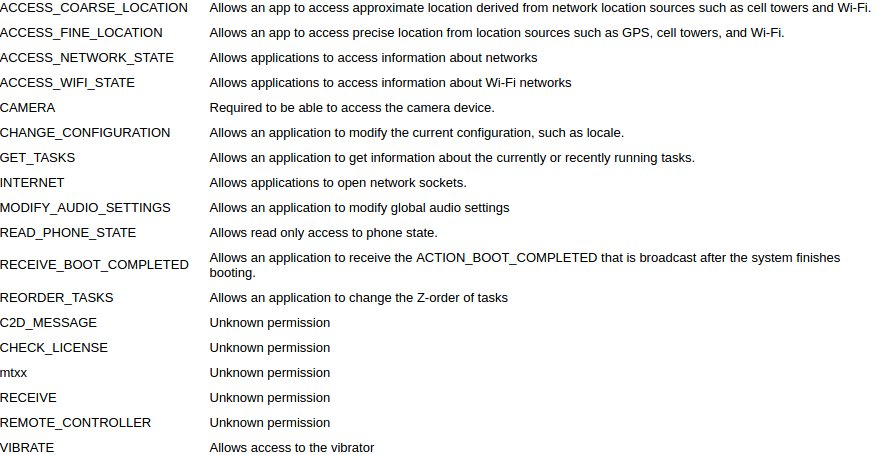
I understand that there are many concerns from the community about Meitu’s requesting of READ_PHONE_STATE permission, but to be frank, there are lots of applications doing that too. I would like to hear your comments on what the consequences of accepting READ_PHONE_STATE permissions are and how bad it can be.
Originally published in 2017. For more on mobile security, follow me on Twitter: ryantzj