The Mystical Android Sandbox and IPC (Inter-process communication)
AndroidAndroid inherits many UNIX security features such as process isolation, UID and GID paradigm, and so on. The idea of Android sandbox is to basically assign each installed application a UID and its user space will conform to the principle of least privilege. Below is a great illustration to visualize Android sandboxing by assigning different UID to every application. This is a well-thought-out security mechanism that really mitigates and simplifies many permission problems that can exist in Android.
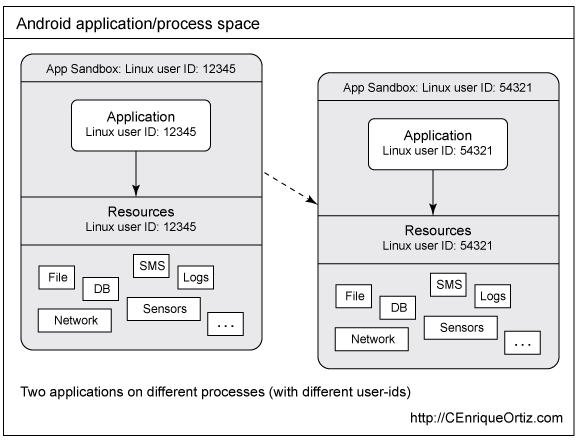
Details of user matrix can be found in /data/system/packages.list. The order of the packages.list format is package name, UID, debuggable flag, data directory, seinfo label and GIDs.
root@hermes:/ # cat /data/system/packages.list
com.miui.gallery 10018 0 /data/data/com.miui.gallery platform 3003,1028,1015,1023
com.android.calendar 10003 0 /data/data/com.android.calendar default 3003,1028,1015
com.android.backupconfirm 10001 0 /data/data/com.android.backupconfirm platform none
As we have discussed, a new UID will be assigned to every newly installed application and GIDs will be assigned depending on what hardware components the application requested. It is obvious that it would be a design fault if the system only relied on the user as the sole mechanism for granting permissions like send SMS, read SMS, and so on. Hence, a privilege metric for permissions is implemented - Protection Level. Every android permission are categorised into 4 different kinds of flags. The system default permissions are described here. Applications may declare their own permissions for other application to use.
-
normal
- The default value. A lower-risk permission that gives requesting applications access to isolated application-level features, with minimal risk to other applications, the system, or the user. The system automatically grants this type of permission to a requesting application at installation, without asking for the user’s explicit approval (though the user always has the option to review these permissions before installing).
-
dangerous
- A higher-risk permission that would give a requesting application access to private user data or control over the device that can negatively impact the user. Because this type of permission introduces potential risk, the system may not automatically grant it to the requesting application. For example, any dangerous permissions requested by an application may be displayed to the user and require confirmation before proceeding, or some other approach may be taken to avoid the user automatically allowing the use of such facilities.
-
signature
- A permission that the system grants only if the requesting application is signed with the same certificate as the application that declared the permission. If the certificates match, the system automatically grants the permission without notifying the user or asking for the user’s explicit approval.
-
signatureOrsystem
- A permission that the system grants only to applications that are in the Android system image or that are signed with the same certificate as the application that declared the permission. Please avoid using this option, as the signature protection level should be sufficient for most needs and works regardless of exactly where applications are installed. The “signatureOrSystem” permission is used for certain special situations where multiple vendors have applications built into a system image and need to share specific features explicitly because they are being built together.
Inter-Process Communication
As illustrated earlier every process on android has its own sandbox and it uses IPC to enable apps to exchange information and data in a secure way. Instead of relying on the Unix IPC, Android is using Binder, a custom implementation of OpenBinder.
Intent messaging is a framework for asynchronous communication built on top of binder. This framework enable to messaging between application. Intent is a messaging object that you can use to request an action from another app component. There are three fundamental use cases:
-
Starting an activity
- An Activity represents a single screen in an app. You can start a new instance of an Activity by passing an Intent to startActivity(). The Intent describes the activity to start and carries any necessary data.
-
Starting a Service
- A Service is a component that performs operations in the background without a user interface. With Android 5.0 (API level 21) and later, you can start a service with JobScheduler. For more information about JobScheduler, see its API-reference documentation.
-
Delivering a broadcast
- A broadcast is a message that any app can receive. The system delivers various broadcasts for system events, such as when the system boots up or the device starts charging. You can deliver a broadcast to other apps by passing an Intent to sendBroadcast() or sendOrderedBroadcast().
There are two types of Intents:
- Explicit Intents
- Specify the exact intent to start by name (the fully qualified class name). Typically this is being used in your own application.
- Implicit Intents
- Does not name specific component, but declare a general action to perform, which allows a component from another app to handle it.
An intent filter is an expression in an app’s manifest file that specifies the type of intents that the component would like to receive. For instance, by declaring an intent filter for an activity, you make it possible for other apps to directly start your activity with a certain kind of intent. Likewise, if you do not declare any intent filters for an activity, then it can be started only with an explicit intent.
References: