Introduction to Dynamic instrumentation in Mobile Security
Android iOSThis is a follow-up blog post after my presentation at Nanyang Technological University’s CSEC Offensive Cyber Security Club, run by a group of highly motivated individuals. Please check out their page to find out when the next security meetup is.
Motivation
I find myself spending more and more time doing dynamic instrumentation and decided to collect some interesting technique I found while doing dynamic instrumentation in mobile security. My motivation of doing it is to:
- understand how client-side security can be bypassed
- optimize the Mobile application reverse engineering process
- optimize the Mobile application penetration testing process
- hunt bugs on popular bug bounty program that has mobile application
Introduction
Dynamic instrumentation is to analyze and modify the behavior of the binary application at runtime through the injection of instrumentation code. It might sound mouthful but essentially, it allows a user to execute their debug script inside another process.
There are mainly two different types of instrumentation: Embedded and injection. Embedded instrumentation can be done by patching the binary application with our instrumentation agent in the form of a shared library, DLL, or dylib. Whereas injection will spawn the instrumentation agent as a process and inject it into the runtime environment like Android Zygote. The main reason to choose one over another is that only embedded can successfully run in a jailed environment.
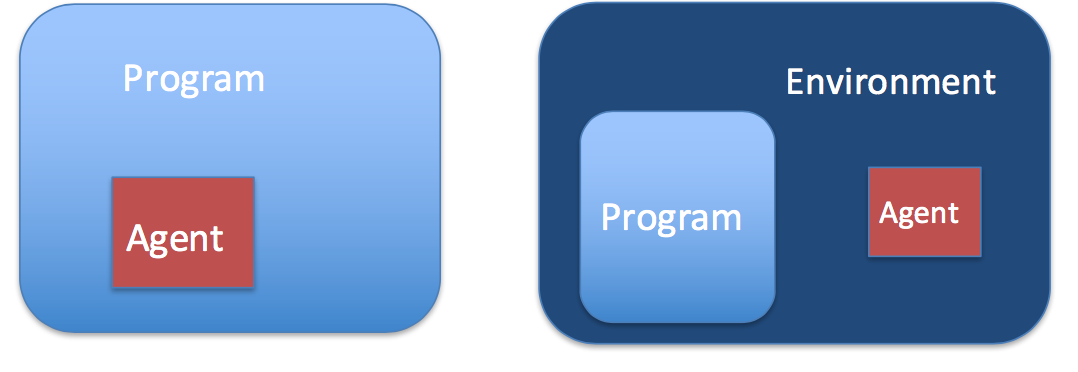
Dynamic instrumentation in Mobile Security
We will be using Frida as our choice of instrumentation framework. Frida injects a JavaScript engine (Duktape or Google V8) into processes to explore native apps on Windows, macOS, Linux, Android, or QNX. With Frida, we can access process memory, overwrite functions during runtime, and hook, call, and trace functions.
One of the main reasons to use dynamic instrumentation in mobile security is to enumerate functions, reverse black box mobile apps, and bypass client-side security. I will demonstrate a few techniques to leverage Frida to bypass some client-side security.
Bypass Official Android SSL Pinning Method
The official Android SSL pinning guidance pins the CA cert on SSLContext.init functions. [1]
// Create a TrustManager that trusts the CAs in our KeyStore
String tmfAlgorithm = TrustManagerFactory.getDefaultAlgorithm();
TrustManagerFactory tmf = TrustManagerFactory.getInstance(tmfAlgorithm);
tmf.init(keyStore);

// Create an SSLContext that uses our TrustManager
SSLContext context = SSLContext.getInstance("TLS");
context.init(null, tmf.getTrustManagers(), null);
We can bypass it by using raptor/0xdea’s script. It will hook the SSLContext.init and substitute the pinned TrustManager to ours.
SSLContext.init.overload("[Ljavax.net.ssl.KeyManager;", "[Ljavax.net.ssl.TrustManager;", "java.security.SecureRandom").implementation = function(a,b,c) {
           console.log("[o] App invoked javax.net.ssl.SSLContext.init...");
           SSLContext.init.overload("[Ljavax.net.ssl.KeyManager;", "[Ljavax.net.ssl.TrustManager;", "java.security.SecureRandom").call(this, a, tmf.getTrustManagers(), c);
           console.log("[+] SSLContext initialized with our custom TrustManager!");
Root Detection
The typical root detection technique employed in Android is to check if SU binary, path or root tags. If any of the blacklisted item were listed, the application will terminate itself. Below is a sample code we reference from the OWASP MSTG Uncrackable - Level 1, you can find the apk here:
public class c {
    /*
     * Enabled force condition propagation
     * Lifted jumps to return sites
     */
    public static boolean a() {
        boolean bl = false;
        String[] arrstring = System.getenv("PATH").split(":");
        int n = arrstring.length;
        int n2 = 0;
        do {
            boolean bl2 = bl;
            if (n2 >= n) return bl2;
            if (new File(arrstring[n2], "su").exists()) {
                return true;
            }
            ++n2;
        } while (true);
    }

    public static boolean b() {
        String string = Build.TAGS;
        if (string != null && string.contains("test-keys")) {
            return true;
        }
        return false;
    }

    public static boolean c() {
        String[] arrstring = new String[]{"/system/app/Superuser.apk", "/system/xbin/daemonsu", "/system/etc/init.d/99SuperSUDaemon", "/system/bin/.ext/.su", "/system/etc/.has_su_daemon", "/system/etc/.installed_su_daemon", "/dev/com.koushikdutta.superuser.daemon/"};
        int n = arrstring.length;
        for (int i = 0; i < n; ++i) {
            if (!new File(arrstring[i]).exists()) continue;
            return true;
        }
        return false;
    }
}
To thwart the root detection mechanism we can either hook on the functions and always return true on every checks or we can prevent the application from quiting.
Always return true
var rootcheck1 = Java.use("sg.vantagepoint.a.c");
    rootcheck1.a.overload().implementation = function() {
            send("sg.vantagepoint.a.c.a()Z   Root check 1 HIT!  su.exists()");
            return 0;
    };

    var rootcheck2 = Java.use("sg.vantagepoint.a.c");
    rootcheck2.b.overload().implementation = function() {
            send("sg.vantagepoint.a.c.b()Z  Root check 2 HIT!  test-keys");
            return 0;
    };

    var rootcheck3 = Java.use("sg.vantagepoint.a.c");
    rootcheck3.c.overload().implementation = function() {
            send("sg.vantagepoint.a.c.c()Z  Root check 3 HIT! Root packages");
            return 0;
    };
Never Quit
[winner doesn’t quit]
setImmediate(function() {
    console.log("[*] Starting script");
    Java.perform(function() {
    console.log("[*] Hooking calls to onDestroy");
    cyClass = Java.use("cy");
        cyClass.onDestroy.implementation = function(v) {
         console.log("[*] onDestroy called.");
        }
        cyClass.sendTroubleshootingLogs.implementation = function() {
                     console.log("[*] sendTroubleshootingLogs called.");
        }
    destroyClass = Java.use("android.app.Activity");
        destroyClass.onDestroy.implementation = function() {
            console.log("[*] Activity.onDestroy called");
        }

        destroyClass.finish.overload() = function(v) {
            console.log("[*] Finish called.");
        }
     console.log("[*] Hooking calls to System.exit");
    exitClass = Java.use("java.lang.System");
    exitClass.exit.implementation = function() {
        console.log("[*] System.exit called");
    }
    killClass = Java.use("android.os.Process");
    killClass.killProcess.implementation = function() {
        console.log("[*] killProcess called");
    }
    finalizersClass = Java.use("System");
    finalizersClass.runFinalizersOnExit.implementation = function(){
        console.log("[*] runFinalizersOnExit called")
    }

    });

});
Hook on JIT Decryption
To add resiliency to reverse engineering, it is common to only decrypt strings just-in-time. If you would like to read more on mobile application reverse engineering resiliency, feel free to check out this page (link may have moved to newer OWASP MSTG location). Below is a JIT example we found in OWASP crackme Uncrackable level 1.
package sg.vantagepoint.a;

import java.security.Key;
import javax.crypto.Cipher;
import javax.crypto.spec.SecretKeySpec;

public class a {
    public static byte[] a(byte[] object, byte[] arrby) {
        object = new SecretKeySpec((byte[])object, "AES/ECB/PKCS7Padding");
        Cipher cipher = Cipher.getInstance("AES");
        cipher.init(2, (Key)object);
        return cipher.doFinal(arrby);
    }
}
We can easily hook on this function to view the JIT decrypted string.
aaClass = Java.use("sg.vantagepoint.a.a");
        aaClass.a.implementation = function(arg1, arg2) {
            retval = this.a(arg1, arg2);
            password = ''
            for(i = 0; i < retval.length; i++) {
               password += String.fromCharCode(retval[i]);
            }

            console.log("[*] Decrypted: " + password);
            return retval;
        }
TouchID Bypass
To demonstrate some other examples of client-side bypass on iOS, we use an example that was demonstrated by leonjza’s amazing objection tool. An iOS application cannot confirm the device’s passphrase/TouchID directly via code, but Apple made it possible via the LAContext helper class. If TouchID is authenticated successfully, it will return a success boolean and execute whatever code the devs programmed to execute when it is successful. Leonjza did an amazing job covering the topic.
Summary
These demonstrate how easy it is to bypass client-side security. It is important to understand it is always possible to bypass client-side security, hence it is important to consider what portion of the code and data should be on the client or server.
Feel free to try out OWASP Crackme if you wish to learn and try out dynamic instrumentation :)
If you haven’t read about my post about cracking the OWASP crackme with Cycript, you can read it here.